Overview
ARI supports multiple AI providers for the built-in AI Assistant and AI-powered module generation. All API keys are stored locally on your server and never shared with ARI or any third party.
Configure your AI providers in Settings > Integrations. API keys you enter through the UI are private to your account — they are not shared with other user accounts on your ARI instance.
When you add API keys in Settings > Integrations, they are stored in your database and encrypted using AES-256-GCM.
Alternatively, you can store your API keys in your
.env.localfile or your host's environment variables manager. This reduces risk because even if your database is ever accessed or compromised, your API keys are not included. It also limits exposure within your application, since the keys are not retrievable through the app itself.All environment variables added to
.env.localare shared with all user accounts on ARI — every user of your instance uses the same key. Keys entered through Settings > Integrations, by contrast, are private to the account that enters them.Choose the approach that aligns best with your security preferences and environment setup.
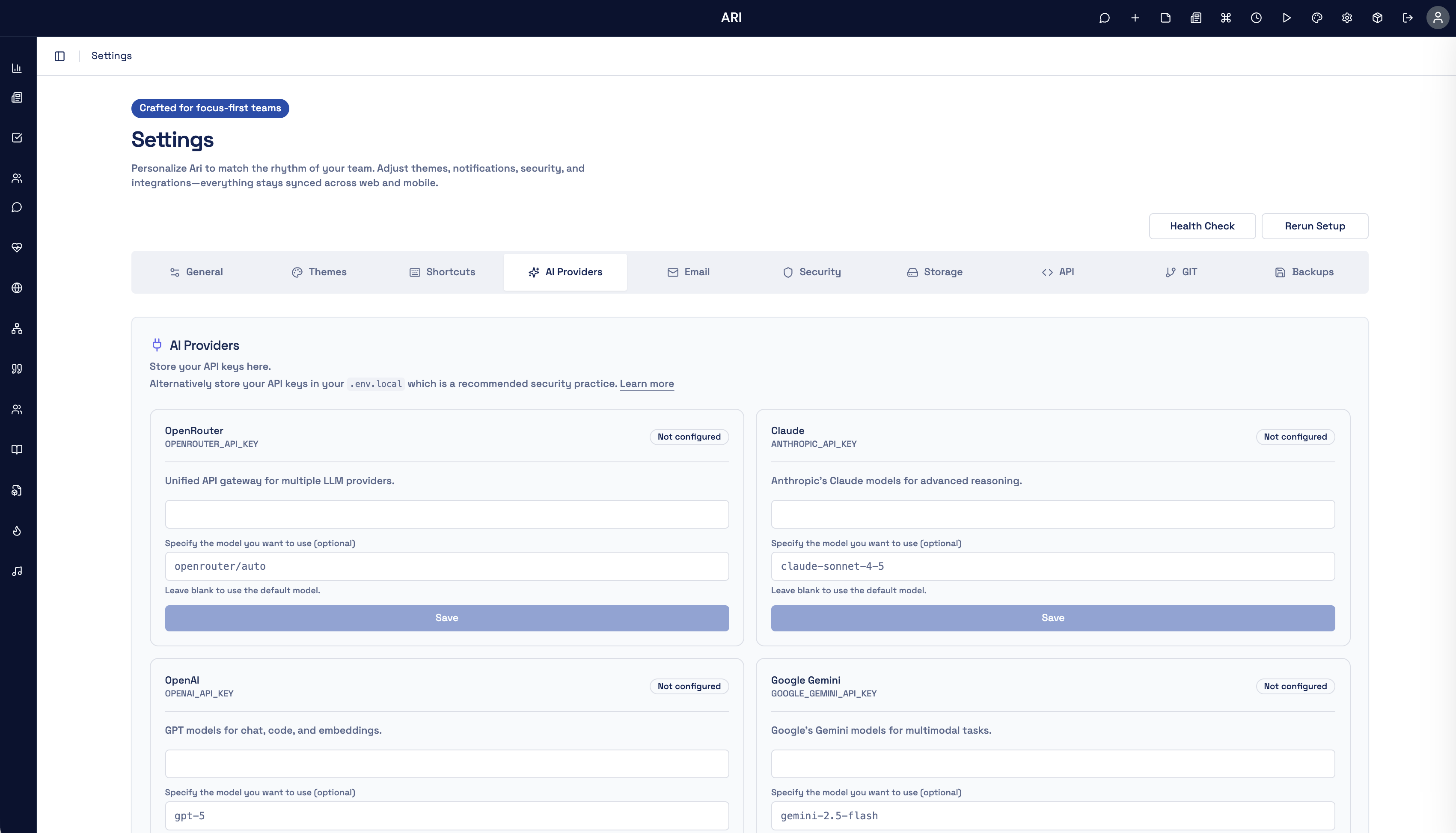
Supported Providers
OpenAI
The default provider for the AI Assistant module and module generation.
- Create an account at platform.openai.com
- Navigate to API Keys and generate a new key
- Add it in Settings > Integrations or set
OPENAI_API_KEYin your environment
Anthropic (Claude)
Use Claude models for the AI Assistant.
- Create an account at console.anthropic.com
- Generate an API key
- Add it in Settings > Integrations or set
ANTHROPIC_API_KEYin your environment
OpenRouter
Access a wide range of AI models through a single API. OpenRouter provides access to models from multiple providers.
- Create an account at openrouter.ai
- Generate an API key
- Add it in Settings > Integrations or set
OPENROUTER_API_KEYin your environment
Google Gemini
Use Google's Gemini models for the AI Assistant.
- Get an API key from Google AI Studio
- Add it in Settings > Integrations or set
GOOGLE_GEMINI_API_KEYin your environment
xAI (Grok)
Use xAI's Grok models with real-time knowledge.
- Create an account at console.x.ai
- Generate an API key
- Add it in Settings > Integrations or set
XAI_API_KEYin your environment
Mistral
Use Mistral's open-weight and frontier models.
- Create an account at console.mistral.ai
- Generate an API key
- Add it in Settings > Integrations or set
MISTRAL_API_KEYin your environment
DeepSeek
Strong reasoning models at low cost.
- Create an account at platform.deepseek.com
- Generate an API key
- Add it in Settings > Integrations or set
DEEPSEEK_API_KEYin your environment
Groq
Ultra-fast inference for open-source models.
- Create an account at console.groq.com
- Generate an API key
- Add it in Settings > Integrations or set
GROQ_API_KEYin your environment
Perplexity
Search-augmented LLMs with online sources.
- Create an account at perplexity.ai
- Generate an API key in your account settings
- Add it in Settings > Integrations or set
PERPLEXITY_API_KEYin your environment
ElevenLabs
Realistic AI voice synthesis and text-to-speech.
- Create an account at elevenlabs.io
- Generate an API key
- Add it in Settings > Integrations or set
ELEVENLABS_API_KEYin your environment
Ollama
Run open-source models locally or on a self-hosted endpoint. No API key required.
- Install Ollama from ollama.com and pull a model
- Add your endpoint URL in Settings > Integrations or set
OLLAMA_BASE_URLin your environment (default:http://localhost:11434)
Security Best Practices
- Never share your API keys or commit them to version control
- Use different keys for development and production
- Rotate keys periodically
- Set usage limits and billing alerts on each provider's dashboard
- Review API usage in each provider's dashboard regularly